Cloud PBX is a phone system hosted on remote servers and delivered over the internet. In 2026, it matters because businesses expect clear voice calls, flexible desks, and predictable costs without owning telephone hardware. A Cloud PBX routes calls through data networks, uses web portals and apps for call handling, and connects to public phone lines when needed.
Compared with on-premises PBX, Cloud PBX removes the need for local servers and on-site maintenance. Compared with older hosted PBX models, modern cloud systems offer faster feature updates, simpler user management, and easier global coverage.
After analyzing 35+ cloud PBX providers from reviews on Gartner and G2, we selected the top ten and compared them on price, call quality, and core features. The results might surprise you; some lesser-known providers outperformed industry giants. Let’s find out which Cloud PBX stands out in 2026.
Get the Best Cloud PBX in Minutes
Tell us your team size and must-have features — we’ll recommend the best-fit provider for your business.
Comparison Table of Top Cloud PBX Providers
| Provider | Starting Price (per user/month) | Key Features | Best For | Voicemail / IVR | Uptime SLA | Badge |
|---|---|---|---|---|---|---|
| Microsoft Teams Phone | US $10 | Integration with Teams, PSTN via Calling Plan, desktop/mobile apps | Large enterprises using Microsoft 365 | Yes | 99.999% | Best for Large Enterprises |
| Cisco Webex Calling | US $17 | Secure collaboration, unlimited local calling, strong analytics | Mid-to-large businesses | Yes | 99.999% | Best for Security-Focused |
| Zoom Phone | US $10–12 | Auto attendants, call queues, video integration | Small-to-medium businesses | Yes | 99.999% | Best Unified Communications |
| RingCentral MVP | US $20 | Team messaging, file sharing, analytics dashboard | All business sizes | Yes | 99.999% | Best Overall |
| 8x8 X Series | US $15 | HD voice, video meetings, analytics and CRM integration | Mid-sized companies | Yes | 99.999% | Best for Analytics |
| Nextiva | US $18 | Multi-level auto attendant, unlimited calling, CRM tools | SMBs and startups | Yes | 99.999% | Best for Small Businesses |
| Vonage Business | US $20 | APIs, call queues, mobility options | Growing businesses | Yes | 99.999% | Best for Flexibility |
| Dialpad | US $15 | AI call transcription, real-time coaching, mobile-first design | Tech-driven SMEs | Yes | 99.999% | Best for Innovation |
| GoTo Connect | US $22 | Unlimited extensions, call routing, integration with MS Teams | SMBs | Yes | 99.999% | Best Value |
| 3CX | Free–US $14 | Self-hosted option, video calls, mobile apps | Budget-conscious users | Yes | 99.9% | Best for Cost Efficiency |
Want a Faster Recommendation?
We’ll shortlist the top 3 providers for your budget, integrations, and uptime needs.
Top 10 Cloud PBX Providers

Microsoft Teams Phone embeds business calling inside Microsoft 365 so IT manages users, security, and compliance from one console. It supports both cloud calling plans and carrier connections, which help organizations move phone services into their existing collaboration workflow.
Key Features
- Phone system licensing
- PSTN connectivity via Calling Plan, Operator Connect, or Direct Routing
- Auto attendants and call queues
- Voicemail-to-email and call recording
- Device management and call analytics for usage and quality
Integrations
- Native connections with Outlook, SharePoint, OneDrive, and Dynamics 365
- Automation supported through Microsoft Graph
- Compatible with certified SIP Trunk Systems and contact center platforms via partners for expanded service workflows
Pros and Cons
- Centralized administration within Microsoft 365 simplifies management
- Multiple PSTN options meet regional and compliance needs
- Strong compliance and security features support regulated industries
- Full PSTN functionality requires additional licenses or carrier setup
- Added licensing and carrier costs increase complexity
- Smaller businesses may struggle with Microsoft’s configuration options
- Migration demands careful planning to avoid service downtime
Pricing Breakdown
Core Phone licensing starts from a per-user add-on. Choosing Calling Plans adds per-user calling fees or minutes. Direct Routing uses third-party carrier charges. Total cost depends on the chosen PSTN path, country rates and required compliance features.
Best For
Businesses already invested in Microsoft 365 want to consolidate collaboration and telephony. Large enterprises and public sector organizations that require central control, compliance logging and multi-region calling options benefit most.
Unique Selling Point (USP)
Unified calling within the Microsoft 365 environment lets IT apply existing identity, security and compliance controls to voice services. It reduces tool sprawl and simplifies administration for organizations that standardize on Microsoft productivity software.

Cisco Webex Calling provides cloud telephony with enterprise-grade controls and broad PSTN options. It ties calls to Webex collaboration tools and Cisco devices, which helps organizations maintain consistent administration and predictable call routing across sites.
Key Features
- Cloud calling functionality
- BYOC (Bring Your Own Carrier) support
- Auto attendants for streamlined call handling
- Built-in call recording capabilities
- Advanced device management and emergency calling options
- Detailed analytics for call performance
- Integration pathways to Cisco Contact Centre products for large-scale deployments
Integrations
- Seamless integration with Webex Meetings and Cisco Contact Centre suites
- Connectivity with Active Directory and major CRM platforms via connectors
- Certified handset vendors and SIP trunks extend PSTN coverage and ensure device compatibility
Pros and Cons
- Strong security framework supports reliable enterprise deployments
- Advanced device ecosystem ensures consistent performance
- Flexible PSTN models allow carrier choice and meet regulatory requirements
- Higher overall cost compared to SMB-focused alternatives
- Administrative overhead can be significant for smaller teams
- Some advanced features may require Cisco professional services
Pricing Breakdown
Base calling plans begin in the mid-teens per user per month. Costs increase with bundles that include meetings or advanced analytics. BYOC reduces vendor calling fees but requires carrier contracts and possible porting charges.
Best For
Enterprises and regulated organizations that need strict security controls, predictable device management and flexible carrier sourcing. Suitable for multi-site deployments with internal telecom teams.
Unique Selling Point (USP)
A telephony service built around Cisco’s collaboration and device ecosystem, which gives organizations direct control over carrier choice and device provisioning while keeping administration consistent across calling and meetings.

Zoom Phone adds corporate calling to the familiar Zoom client to offer a single user interface for voice and video. It simplifies deployment for teams already using Zoom meetings and reduces the learning curve for end users.
Key Features
- Auto attendants and call queues for organized call routing
- Call transfer and recording capabilities
- Number porting for seamless migration
- Mobile and desktop client support for flexible access
- Built-in analytics for call performance insights
- Choice of metered or unlimited domestic calling plans
Integrations
- Native integration with Zoom Meetings and Zoom Rooms
- CRM connectors for unified customer interactions
- API access for custom workflow automation
- Integration options with helpdesk and contact management systems
Pros and Cons
- Simple rollout for existing Zoom users
- Consistent client experience across voice and video
- Competitive pricing for unlimited domestic plans in many markets
- International coverage varies by region
- Limited advanced PBX customization compared with traditional systems
- Businesses with complex or regional PSTN needs must confirm number availability before adoption
Pricing Breakdown
Offers metered and unlimited plans. Metered plans start lower with pay-per-minute charges. Unlimited domestic plans have flat per-user fees. International plans and additional numbers add to the monthly cost depending on the country rates.
Best For
Distributed teams and small to mid-sized organizations that already rely on Zoom for meetings and prefer a single client for audio and video communications.
Unique Selling Point (USP)
A unified client for meetings and corporate calling that reduces user training and centralizes communication administration for organizations that standardize on the Zoom platform.
Not Sure Which One to Pick?
We’ll help you choose based on call quality, scalability, and
real-world pricing.

RingCentral MVP provides a full communications platform that combines cloud calling, messaging and optional contact centre capabilities. It suits organizations that want a single supplier for core phone services and customer service extensions.
Key Features
- Cloud PBX System with unified voice, messaging, and video capabilities
- Team messaging and video meetings for streamlined collaboration
- Intelligent call routing and analytics for better visibility
- Contact centre add-ons to support customer service operations
- Extensive admin portal for centralized management
- Broad support for handsets and mobile clients
Integrations
- Prebuilt integrations with Microsoft 365, Google Workspace, Salesforce, and Zendesk
- Public APIs for deep integration into CRM and business systems
- Supports custom workflows and detailed reporting
Pros and Cons
- Comprehensive feature set supports both internal collaboration and external customer service
- Broad partner ecosystem simplifies regional deployment and management
- Pricing tiers and required add-ons can raise overall cost
- Overlapping features between tiers add complexity when selecting plans
- Businesses should map required features carefully to avoid unexpected expenses
Pricing Breakdown
Entry-level plans typically begin at around $20 per user per month, while advanced tiers include analytics and contact centre capabilities at increased prices. International calling, extra numbers and contact centre modules increase the final monthly spend.
Best For
Businesses of all sizes that need an integrated communications platform and the option to expand into a managed contact centre without switching vendors.
Unique Selling Point (USP)
A single vendor that spans calling, messaging and contact centre capabilities with many prebuilt integrations, which reduces the need to coordinate multiple suppliers as communication needs scale.

8×8 X Series combines cloud calling with analytics and contact centre features to help managers track call performance. It targets organizations that require global reach and measurable operational metrics.
Key Features
- HD voice quality for clear communication
- Global PSTN coverage for international calling
- Built-in call recording and contact centre functionality
- Real-time dashboards for live visibility into operations
- Analytics exports for deeper performance insights
- Native desktop and mobile applications designed for distributed teams
Integrations
- Connectors for Salesforce, Microsoft 365, and Google Workspace
- Public APIs for custom integrations and workflow automation
- Reporting exports compatible with business intelligence tools and operational dashboards
Pros and Cons
- Strong focus on analytics and reporting for tracking service levels and agent productivity
- Global calling plans simplify international communication coverage
- Advanced analytics and contact centre tools limited to higher tiers
- Support quality may vary across regions
- Entry tiers may suit organizations with basic reporting needs better
Pricing Breakdown
Base plans begin in the mid-teens per user per month, with higher tiers for analytics and contact centre services. International minute bundles and advanced reporting add to the monthly cost depending on region and volume.
Best For
Mid-sized companies that need international calling and operational visibility into phone performance without deploying separate analytics tools.
Unique Selling Point (USP)
Combines unified voice and contact centre functionality with built-in analytics so managers can measure call operations without assembling separate reporting systems.

Nextiva offers straightforward cloud telephony with integrated customer relationship features to help small firms manage customer interactions without juggling multiple vendors. It focuses on easy onboarding and predictable domestic calling.
Key Features
- Auto attendants and multi-level IVR Systems for efficient call handling
- Unlimited domestic calling available on select plans
- Voicemail and CRM integration for improved communication flow
- Reporting dashboards for call activity and performance tracking
- Simple user management tools for easy administration
Integrations
- Native connectors for leading CRMs and helpdesk platforms
- Compatibility with Microsoft and Google productivity suites
- API access for automation and call logging within business systems
Pros and Cons
- Fast onboarding and responsive support tailored for smaller organizations
- Integrated CRM tools reduce the need for multiple subscriptions
- Simplified workflows and predictable domestic calling make it ideal for small teams
- Limited international PSTN coverage compared with global providers
- Advanced enterprise and custom contact centre features require higher-tier plans
Pricing Breakdown
Plans typically fall in the mid-teens per user per month, with higher tiers adding CRM and analytics. Unlimited domestic calling often appears in mid-level plans. International calling and add-ons are charged separately.
Best For
Small and growing businesses that want a quick setup, integrated customer management and predictable domestic calling costs without complex telecom procurement.
Unique Selling Point (USP)
An easy-to-deploy phone system that couples telephony with basic CRM tools so small teams can handle calls and follow-ups from a single platform.

Vonage Business combines standard cloud PBX services with a programmable API layer. It supports businesses that need both ready-to-use telephony and the ability to embed voice and messaging into workflows or products.
Key Features
- Cloud PBX with reliable voice communication
- Advanced call routing and call recording functions
- Built-in SMS and mobile app support for on-the-go communication
- Programmable voice and messaging APIs for custom integrations and automation
Integrations
- Prebuilt connectors for Salesforce and Microsoft Dynamics
- Developer APIs for tailored CRM integrations and IVR workflows
- Event-driven messaging support for order updates and notification systems
Pros and Cons
- Robust API platform allows embedding calls and messages into customer or internal workflows
- Flexible number management and mobility options support distributed teams
- Programmable features can increase usage-based costs
- Businesses not needing developer capabilities may pay for unused features
- API usage should be carefully evaluated to estimate true monthly expenses
Pricing Breakdown
User plans sit in the mid price range with additional charges for programmable API usage, numbers and international minutes. Final costs are usage-dependent and scale with message and API call volumes.
Best For
Companies that need both a standard business phone system and developer tools to integrate voice or SMS into applications and back office workflows.
Unique Selling Point (USP)
Combines a full PBX with a mature developer platform so businesses can run standard phone services while building custom telephony experiences and automation.

Dialpad focuses on real-time conversation intelligence and a mobile-first calling experience. It targets teams that need quick insights from calls to improve coaching and sales performance.
Key Features
- Live call transcription and post-call summaries for improved insights
- Call coaching tools and intelligent routing for enhanced team performance
- Mobile and desktop apps for flexible communication
- Basic contact centre features to support coaching and quality assurance
Integrations
- Seamless integration with Google Workspace, Microsoft 365, Salesforce, and Zendesk
- APIs for transcript exports and CRM logging
- Centralized call data to support performance tracking and reporting
Pros and Cons
- Real-time transcription and coaching tools accelerate agent training and improve response times
- Mobile-first design supports sales and support teams working on the move
- Transcription accuracy varies with audio quality and speaker accents
- Global PSTN coverage is narrower than major incumbents
- Organizations should test transcription in core languages before full deployment
Pricing Breakdown
Core calling and AI features are offered in per-user tiers, typically in the mid-teens per month. Advanced contact centre and enterprise features increase the price. International calling and transcription volume may incur additional charges.
Best For
Sales and support teams that need immediate call insights and coaching to improve performance and shorten onboarding time for new agents.
Unique Selling Point (USP)
Integrates live conversation intelligence into everyday calling so managers can coach, measure and improve agent interactions without separate analytics tools.

GoTo Connect bundles cloud calling and meetings into a single product aimed at small offices. It delivers predictable pricing and a simple admin experience for organizations with limited IT resources.
Key Features
- Hosted PBX capabilities for reliable business calling
- Call routing and voicemail-to-email functionality
- Unlimited extensions for scalable team communication
- Desktop and mobile clients for flexible access
- Basic reporting tools for call visibility
- Built-in meeting functionality designed for small teams
Integrations
- Compatible with Google Workspace and Microsoft 365
- CRM connectors for streamlined customer data management
- APIs supporting workflow automation and contact syncing
Pros and Cons
- Straightforward setup simplifies deployment and reduces procurement time
- Clear bundled pricing suits small teams transitioning from on-premises systems
- Limited PBX customization and advanced contact centre capabilities
- International calling often requires additional add-ons
- Businesses needing detailed telephony controls or broad PSTN coverage should confirm regional support availability
Pricing Breakdown
Per user pricing with common SMB tiers that include domestic calling and meetings. Add-ons for international calling and advanced reporting raise the monthly cost. Annual billing discounts are commonly available for predictable budgeting.
Best For
Small and micro businesses that need reliable calling and meeting features with minimal IT overhead and predictable monthly costs.
Unique Selling Point (USP)
A simple bundled voice and meeting solution that reduces setup time and vendor complexity for small teams moving to cloud communications.

3CX is a flexible PBX offered as free software or paid editions and available through hosting partners such as Sangoma. It suits organizations that want control over trunking, capacity and hosting model while keeping licensing costs low.
Key Features
- SIP Trunk System compatibility for flexible connectivity
- Web conferencing and call queue support for efficient communication
- Voicemail and mobile apps for accessibility across devices
- Multi-tenant management for scalable deployments
- Options for self-hosted or partner-hosted cloud environments
Integrations
- Integration with widely used CRMs and directory services
- SIP trunking provides extensive PSTN connectivity options
- Partner-hosted deployments enable managed integrations and regional support
Pros and Cons
- Low licensing cost and flexible hosting options appeal to budget-conscious teams
- Self-hosting offers complete control over trunking and backup management
- Self-hosting requires IT expertise to manage security, updates, and backups
- Hosted partner quality and SLAs can vary
- Total cost of ownership depends on hosting model and internal staff resources
Pricing Breakdown
Free edition covers basic features, with paid editions priced by simultaneous call capacity. Hosting through partners like Sangoma adds monthly hosting and support fees. Trunk costs and porting vary by carrier and region.
Best For
IT-capable small and medium organizations that want to control hosting, trunking and capacity while minimizing licensing cost through self-hosting or partner-managed services.
Unique Selling Point (USP)
Flexible licensing and hosting choices let organizations pick self-hosting to reduce licensing fees or choose partner hosting for local support while retaining control over telephony configuration.
Avoid a Costly PBX Mistake
Get expert guidance on uptime SLAs, hidden add-ons, and the best plan for your use case.
How to Choose the Right Cloud PBX Provider
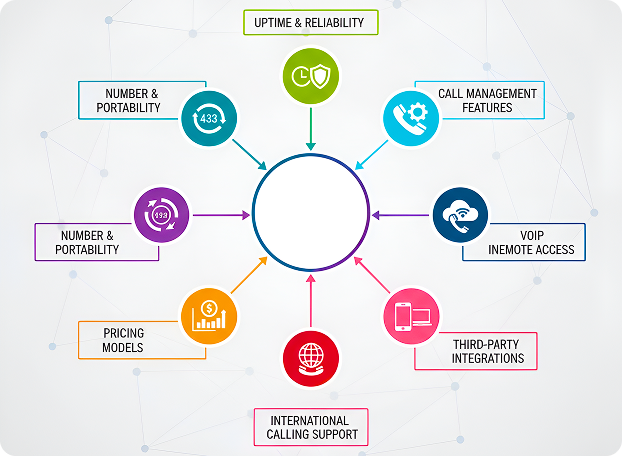
Uptime & Reliability
Choose the provider with the proven uptime of at least 99.999%. Reliable performance ensures consistent communication and reduces costly disruptions. Check their service-level agreements and real-world performance data before making a decision.
Call Management Features
Select the solution with advanced call handling options like call queues, routing, forwarding, and IVR menus. These features improve response time and enhance customer experience. Furthermore, it maintains organized communication within the company.
VoIP Integration
Ensure the seamless integration of PBX with VoIP Phone Systems to deliver clear audio quality and low latency. Effective integration allows unified management of voice and data without requiring complex or additional configurations.
Mobile & Remote Access
Select a system with secure mobile and desktop applications to support remote or hybrid work models. Mobile access keeps staff connected, enabling calls, messages, and meetings from any location.
Number Portability
Confirm that the provider allows a smooth transfer of the existing business setup to the new setup. It maintains brand consistency and prevents downtime during migration. Moreover, it saves time by avoiding the complete reconfiguration of phone lines.
Pricing Models
Compare transparent pricing structures with clear feature tiers. Choose a provider that offers scalable plans matching business size and usage, so costs remain predictable as the organization grows.
International Calling Support
If business operations are working across regions, ensure the provider offers international calling with stable connections and reasonable per-minute rates. This is vital for maintaining customer and partner communication globally.
Third-Party Integrations
Opt for the PBX system that integrates with tools like CRM, project management, and helpdesk software. This creates connected workflows, centralizes data. Moreover, it eliminates repetitive tasks and improves operational efficiency.
Best Cloud PBX for Specific Use Cases
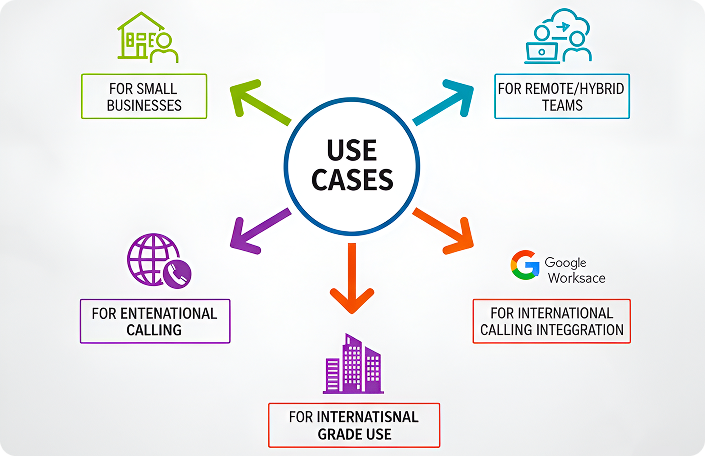
For Small Businesses
Nextiva and 8×8 offer affordable plans with reliable uptime and strong customer support. Their simple interfaces, quick setup, and scalable features make them practical choices for small teams managing limited budgets.
For Remote/Hybrid Teams
Zoom Phone and Dialpad provide seamless mobile and desktop access. Moreover, it keeps remote staff connected across different time zones. Both include real-time analytics and AI-based call routing to maintain consistent collaboration and call quality.
For Enterprise-Grade Use
Microsoft Teams Phone and Cisco Webex Calling deliver enterprise-level security, centralized administration, and dependable global performance. These platforms handle high call volumes efficiently while supporting integration with corporate identity and compliance systems.
For International Calling
Multiple providers offer long-term contracts at significantly discounted rates compared to monthly packages. Higher charges are applied to users who demand monthly packages. However, flexibility is provided for seasonal operations or companies in transition.
With Microsoft Teams or Google Workspace Integration
Microsoft Teams Phone integrates directly into Microsoft 365, while RingCentral and Nextiva connect smoothly with Google Workspace. These integrations simplify workflow management by combining communication tools with everyday productivity applications.
Cloud PBX Pricing Models
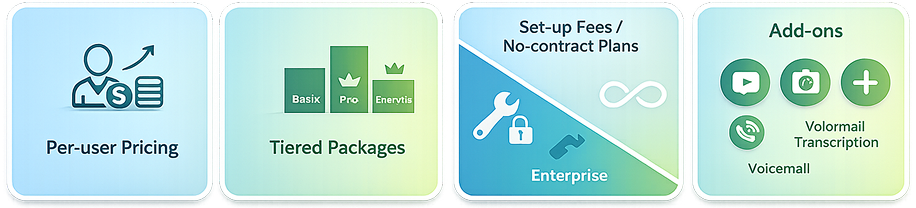
Per-user Pricing
Per-user pricing offers predictable monthly costs. In this package, each employee is assigned an individual license. This model suits growing businesses that need scalability. Additionally, it allows the addition or removal of users more easily without altering any system.
Tiered Packages
Tiered plans provide flexible pricing based on feature levels. Companies can choose a package aligned with their communication volume and complexity. Similarly, it ensures cost control while accessing advanced features as their business requirements evolve.
Set-up Fees or No-contract Plans
Although some providers offer contract-free plans, others charge an initial setup fee for onboarding. The choice between them depends on the requirements and priorities of the business. Either they prioritize long-term stability or prefer flexible, short-term arrangements without binding commitments.
Add-ons: Voicemail Transcription, Video Conferencing, SMS
Communication efficiency is significantly enhanced by optional add-ons. It includes features like voicemail transcription, integrated video meetings, and business SMS support to streamline collaboration. In addition, it enables teams to handle varied communication requirements through a unified and secure cloud PBX platform.
Want the Best Pick for Your Exact Use Case?
Get a personalized recommendation based on your team size, integrations (Microsoft/Google/CRM), and calling needs.
Verdict
Which Cloud PBX Should You Choose?
Generally, business customers select the most suitable PBX based on business size, price and features. After careful evaluation of 35+ providers from G2, Gartner and other social media platforms reviews, I have a few suggestions for our customers. Based on cost, use case and features, the top three standouts are RingCentral MVP, Microsoft Teams Phone and Nextiva.
RingCentral MVP is the best all-around solution with advanced analytics, reliable uptime, and scalability across industries. Microsoft Teams Phone fits large enterprises already using Microsoft 365, offering seamless collaboration and enterprise-grade compliance. For smaller businesses, Nextiva delivers the best value through easy setup, predictable pricing, and built-in CRM tools. Each option ensures secure, high-quality communication without the complexity of on-premise systems. Moreover, it enables teams to stay connected and productive regardless of their location.
If you are stuck while deciding on a PBX Phone System for your business you can seek help from Voxtium. Our Telecom advisors will help you find the perfect solution for your business specific needs