Managed PBX is a phone system where hardware lives at your business place but managed by an external provider. The provider operates the switching and call control from secure data centres and delivers voice service to business phones, desktops, or mobile apps through the internet or public phone network. Unlike on-premises PBX, it removes hardware needs, shortens setup time, and shifts ongoing maintenance to the vendor. Compared with self-managed cloud systems, it offers predictable monthly costs and automatic updates.
After analyzing more than 25 cloud PBX providers on Gartner and G2, we identified the top options that bring the best options for businesses in the US. This guide outlines which platforms provide the best mix of reliability, call quality, and pricing. Each includes key features, such as voicemail-to-email, call routing, and automatic failover, that help reduce downtime and strengthen customer communication.
Get a Shortlist in 60 Seconds
Tell us your team size + must-have features. We’ll recommend the best managed PBX options for your business.
Glimpse of Top Managed PBX Providers
| Provider | Starting Price | Uptime | Notable Features | Best For | Badge |
|---|---|---|---|---|---|
| RingCentral | $19.99/user/month | 99.999% | Auto-attendant, Call recording, CRM integrations | Scalable enterprises | Best Overall |
| Nextiva | $18.95/user/month | 99.999% | Voicemail-to-email, Analytics, Call forwarding | Growing SMBs | Best Support |
| 8x8 | $15/user/month | 99.999% | Unlimited calling, Team messaging, Analytics | International businesses | Best Value |
| Dialpad | $15/user/month | 99.9% | AI transcription, IVR, Mobile app | Tech-savvy teams | Best AI Features |
| GoTo Connect | $24/user/month | 99.99% | HD video, Call queues, Integrations | Remote teams | Best for Remote Work |
| Vonage Business | $19.99/user/month | 99.999% | Call continuity, Admin portal, APIs | SMBs and developers | Best API Flexibility |
| Zoom Phone | $10/user/month | 99.99% | Zoom integration, Call switching, Voicemail | Zoom users | Best for Meetings Integration |
| Cisco Webex Calling | $20/user/month | 99.999% | Enterprise security, PSTN options, Call routing | Large enterprises | Best for Security |
| Mitel | $20/user/month | 99.99% | Unified communications, Contact center tools | Mid-sized companies | Best for Hybrid Deployment |
| Ooma Office | $19.95/user/month | 99.99% | Virtual receptionist, Ring groups, Mobile app | Small businesses | Best for Small Businesses |
Want Help Picking the Right Provider?
We’ll match you with the best option based on uptime needs, budget,
and integrations.
Top 10 Managed PBX Providers Detailed Reviews

RingCentral is a mature Managed PBX and unified communications provider that serves small teams to large enterprises. It offers phone, messaging, and meeting apps managed by RingCentral and delivered over the internet. The platform is notable for broad third-party integrations and a service-level uptime commitment.
Key Features
- Auto-attendants and call queues streamline routing for incoming calls.
- Call forwarding and voicemail-to-email ensure employees stay reachable anywhere.
- Call recording supports quality control and compliance tracking.
- Built-in analytics provide visibility into call performance and user activity.
- Centralized administration tools let IT teams manage users and permissions with ease.
- Advanced reporting combines operational and performance insights for better decision-making.
Integrations
- Works with Salesforce, Microsoft 365 / Teams, Google Workspace, HubSpot, Zendesk, and Slack.
- Click-to-dial and call logging features connect phone activity directly within CRM tools.
- Supports automated contact syncing and activity tracking to keep customer data consistent.
Pros and Cons
- Strong Integration Options
- Scalable For Growing Teams
- Reliable Performance And Uptime
- Higher Pricing For Advanced Tiers
- Occasional Call Quality Issues
- Complex Admin Setup For Small Teams
Pricing Breakdown
RingCentral Phone System offers monthly and annually packages. Its pricing typically revolves around $20 per user/per month if billed annually. Monthly packages are more expensive than annual packages. The basic plan targets small teams and offers essential PBX features. In contrast, the more advanced plans provide enhanced analytics, expanded integration possibilities, and contact centre functionalities. Since final pricing may vary depending on user counts and add-ons, businesses are encouraged to confirm exact costs with RingCentral before committing.
Best For
Small to large businesses that need a single vendor for phone, messaging, and meetings and that rely on integrations with CRM or productivity tools.
Unique Selling Point (USP)
RingCentral combines a full set of phone-system features with an extensive integration library and a published uptime SLA aimed at continuous availability. For organizations that want one managed platform covering calling, meetings, and messaging, RingCentral reduces the number of vendors to manage.

Nextiva Business VoIP is recognized for dependable service and excellent customer support, and offers a managed PBX solution. The platform integrates business telephony, team messaging, and collaboration features into one seamless system. It caters to small, mid-sized, and large organizations by providing an easy-to-use communication management alternative that eliminates the need for complicated on-premises infrastructure.
Key Features
- Auto-attendants, call routing, and voicemail-to-email support efficient call handling.
- Call recording and analytics dashboards help track performance and customer engagement.
- Team chat and video conferencing enable real-time internal collaboration.
- Centralized management tools simplify user setup and system administration.
- Insights from analytics assist in improving service quality and operational decisions.
Integrations
- Connects with Salesforce, HubSpot, Microsoft Outlook, and Google Contacts.
- Automatically logs calls and syncs contact details to reduce manual work.
- Allows staff to access call history and communication data within existing business tools.
Pros and Cons
- Reliable uptime ensures consistent communication without interruptions.
- Intuitive interface simplifies daily operations and user adoption.
- A strong customer support team provides timely assistance and guidance.
- Simplified setup and management benefit businesses with limited IT resources.
- Advanced analytics and detailed reporting are locked behind higher-tier plans.
- New users may experience a slight learning curve when exploring all available tools.
Pricing Breakdown
Plans typically begin at about $18.95 per user each month, with lower rates for annual contracts. As the tiers increase, additional services such as call recording, deeper analytics, and CRM integrations are unlocked. Although pricing depends on the number of users and selected features, Nextiva is generally positioned competitively in the managed PBX space
Best For
Nextiva is best suited for small to mid-sized businesses that want reliable phone service with strong customer support. It also fits larger companies seeking an easy-to-manage, all-in-one communication platform that can grow with their needs.
Unique Selling Point (USP)
Nextiva distinguishes itself through its focus on reliability and attentive customer support. Its ability to provide a unified communication solution, while keeping setup and maintenance straightforward, makes it appealing to companies that want reassurance alongside modern PBX functionality.

8×8 provides a managed PBX platform that brings together voice, video, messaging, and contact center capabilities within a unified cloud-based system. Designed for companies of different scales, it provides unlimited calling, team chat, and large-capacity meetings. Its competitive edge is the ability to serve businesses worldwide while offering a complete communications suite that replaces traditional phone systems.
Key Features
- Auto-attendants, call routing, and call queues ensure smooth inbound management.
- Unlimited voice calling (domestic and selected international zones) reduces communication costs.
- Voicemail-to-email and HD video conferencing improve accessibility and team interaction.
- Collaboration tools include team messaging, file sharing, screen sharing, and meetings with up to 500 participants.
- Supervisory tools, such as call monitoring, whisper, and barge, assist in quality control and training.
- Analytics dashboards display call volume, response times, and overall usage metrics for performance tracking.
Integrations
- Integrates with Microsoft Teams, Salesforce, Google Workspace, Freshdesk, and HubSpot.
- Enables click-to-dial directly from CRM and helpdesk interfaces for faster outreach.
- Syncs contact data and logs calls automatically to maintain accurate customer records.
- Offers open APIs for custom integrations tailored to specific business needs.
Pros and Cons
- Extensive feature set including unlimited North American calling and HD video support.
- Reliable global infrastructure ensures consistent service quality.
- Unified communications with integrated telephony, messaging, and collaboration.
- Scalable platform suitable for growing or distributed teams.
- The learning curve can be steep when configuring or managing advanced tools.
- International calling outside included zones can become costly.
- Smaller businesses may find pricing high if they require only basic features.
Pricing Breakdown
8×8 offers at least two main tiers under its “X Series.” The X2 plan typically begins around $24 per user per month (when billed annually), and includes unlimited calling in designated countries (14 in many cases), video conferencing, messaging, and basic analytics. Moving up, the X4 plan increases international coverage (up to 48 countries), adds supervision tools (barge, whisper), and deeper analytics for around $44 per user per month (annual billing). For contact center-level functionality (multichannel, advanced analytics, etc.), there are higher tiers (such as X6, X7, X8) with prices rising further. Exact figures often depend on volume, locations, and add-ons.
Best For
Organizations that benefit most from 8×8 are those that require a truly global communications solution. Companies with distributed or remote teams, or businesses that need unified calling, video, team messaging, and support tools under one roof, will find strong value. Also, teams that want meeting features with large participant capacity and supervisors that need visibility into call flow are in the sweet spot. It might be less cost-efficient for very small businesses that need only basic calling and minimal functionality.
Unique Selling Point (USP)
The distinguishing factor for 8×8 is its worldwide telephony reach combined with a complete UCaaS solution. The platform doesn’t just provide phone service, but integrates meetings, messaging, and contact center-style oversight, all in one system. For businesses wanting one vendor to manage their entire communication stack, 8×8 offers that with strong scalability and a wide feature scope.
Stop Scrolling — Get a Recommendation
If you already know your use case (SMB, remote team, enterprise), we’ll point you to the best-fit PBX.

Dialpad is a managed PBX platform built on artificial intelligence and cloud technology. It offers voice, messaging, and video in one system. Its user-friendly interface and AI-powered transcription features make it an ideal choice for businesses. Similarly, it looks easy to set up and adaptable. The platform caters to startups, small teams, and enterprises needing scalable, modern communications
Key Features
- Intelligent call routing ensures callers reach the right person without delay.
- Real-time voice and voicemail transcription improve record-keeping and accuracy.
- Call recording and web conferencing support remote collaboration and compliance.
- Team messaging and custom call flows streamline internal communication.
- AI-driven meeting summaries and action items reduce follow-up time and improve productivity.
- Advanced search across conversations helps teams retrieve key information quickly.
Integrations
- Integrates with Google Workspace, Microsoft 365, Salesforce, HubSpot, and Slack.
- Enables click-to-call, automatic logging, and meeting scheduling within familiar tools.
- API access allows custom integrations tailored to business workflows.
- Helps organizations maintain unified operations across their preferred software platforms.
Pros and Cons
- Easy-to-use interface with quick deployment, ideal for small businesses.
- AI-powered transcription enhances meeting productivity and accuracy.
- Strong flexibility for mobile and remote teams.
- Modern, intuitive design that simplifies communication management.
- Advanced capabilities may be limited compared to enterprise competitors.
- Call quality can fluctuate based on network performance.
- Enterprise-level reporting and analytics require higher-tier plans.
- May not fully meet the needs of organizations with global telephony demands.
Pricing Breakdown
The entry-level Standard plan starts at about $15 per user each month, covering unlimited calls in the US and Canada, voicemail transcription, messaging, and AI transcription. For roughly $25 per user monthly, the Pro plan expands features with CRM connections, multi-location management, and enhanced tools. Customized enterprise pricing is available on request.
Best For
Dialpad is best suited for startups, small businesses, and mobile-first teams that want quick deployment and modern tools without heavy technical overhead. It is also effective for organizations prioritizing AI transcription and real-time collaboration. Larger global enterprises may find it less robust for international voice coverage or advanced analytics needs.
Unique Selling Point (USP)
Dialpad’s standout advantage is found in its integrated AI, through which real-time transcription, call summaries, and actionable insights are delivered throughout conversations. Unlike many alternatives, even basic plans are offered with these advanced capabilities. By combining a strong AI foundation with an intuitive interface, Dialpad is positioned as both accessible and future-oriented in the communications space.

GoTo Connect delivers a managed PBX system that merges VoIP Phone System, messaging, and video conferencing in a single platform. It modifies your system and converts hardware-based setups to cloud systems. The service appeals to organizations with its streamlined interface, aiming for simple collaboration tools that can scale as they grow.
Key Features
- Unlimited calling across the U.S. supports cost-efficient communication.
- Voicemail-to-email, call queues, and automated attendants enhance call management.
- HD video meetings, instant messaging, and screen sharing enable real-time collaboration.
- A visual dial plan editor allows easy customization of call routing without technical expertise.
- Scalable setup helps businesses manage both internal and customer communications efficiently.
Integrations
- Connects with Microsoft Teams, Google Workspace, Salesforce, Slack, and Zoho.
- Supports click-to-dial, automated call logging, and contact synchronization.
- Ensures smooth operation across existing business tools for unified communication.
- Provides API access for tailored workflows and integration with specialized applications.
Pros and Cons
- User-friendly interface with reliable performance and easy management.
- The drag-and-drop dial plan tool simplifies configuration and reduces setup time.
- Suitable for mid-sized businesses seeking a balanced and stable solution.
- Consistent reliability makes it a dependable managed PBX option.
- Analytics features are less advanced compared to some competitors.
- International calling outside bundled packages can be costly.
- Some integrations are restricted to higher-tier plans.
- Limited reporting depth for data-driven organizations.
Pricing Breakdown
Packages commonly begin at $27 per user each month. It mainly covers unlimited domestic calls, meetings, and essential PBX tools. Lower rates are typically offered for annual commitments or larger teams. Expenses rise with the addition of global calling options or more advanced integrations, but overall pricing stays competitive with other managed PBX providers.
Best For
The platform is a strong match for mid-sized companies and expanding organizations looking for dependable communications without the burden of complex IT requirements. Teams that want calling, video, and messaging integrated under one provider will gain the most benefit. Smaller firms without full IT departments also find the system manageable.
Unique Selling Point (USP)
Its standout element is the visual dial plan editor, which enables businesses to design and adjust call flows quickly. Combining unlimited calling with integrated video conferencing. A convenient solution is served by GoTo Connect for companies seeking to streamline their communications, while control and flexibility in call routing are retained.

Vonage Business Phone is a managed PBX solution customized for small to mid-sized companies seeking dependable voice, video, and messaging services. Instead of a hardware-based system, it is primarily built on a secure cloud infrastructure instead of a hardware-based system. Furthermore, it provides mobility, scalability, and integrations with popular CRMs and productivity apps. As a result, evolving business communication requirements are fulfilled by this adaptable and flexible choice.
Key Features
- Unlimited domestic calling and texting keep teams connected without usage limits.
- Multi-level auto attendants and call groups streamline call routing and handling.
- Voicemail transcription and visual voicemail improve accessibility and responsiveness.
- On-demand call recording supports training, compliance, and service quality.
- Mobile and desktop apps enable seamless collaboration across office and remote setups.
- Advanced call routing adapts to user availability and device preferences for consistent communication.
Integrations
- Integrates with Microsoft Teams, Office 365, Google Workspace, Slack, Salesforce, HubSpot, and Zoho.
- Connects to hundreds of additional apps through Zapier and open APIs.
- Enables businesses to embed communication tools directly into existing workflows.
- Offers flexibility for organizations using varied software ecosystems.
Pros and Cons
- Highly reliable platform with strong mobility and integration capabilities.
- APIs allow flexible customization and scalability for diverse business needs.
- Suitable for growing organizations that require adaptable communication tools.
- Customer support receives mixed feedback from users.
- Advanced features are often restricted to higher-tier plans.
- Can become costly for smaller businesses with limited budgets.
Pricing Breakdown
Vonage provides three standard subscription levels. The Mobile plan is $19.99 per user each month and includes core calling and messaging tools. The Premium plan costs $29.99, adding CRM integration and video meetings. The Advanced plan, at $39.99, offers extras such as call recording and visual voicemail. Tailored enterprise packages can be arranged.
Best For
Vonage is best suited for growing businesses that want reliable communications with strong CRM and productivity tool integrations. It is particularly useful for hybrid teams and companies planning to scale, but less ideal for very small businesses seeking advanced features at entry-level prices.
Unique Selling Point (USP)
Vonage’s USP lies in its modular flexibility. Companies can begin with a low-cost starter plan and expand by adding features and integrations as requirements increase. This way, the communication system develops in line with business growth, avoiding unnecessary expenses on tools not needed at the outset.

Zoom Phone is a cloud-based PBX service that extends the Zoom platform beyond video meetings into voice communications. It offers flexible call management, mobile and desktop apps, and international coverage, which is designed for businesses of all sizes. It’s especially appealing to organizations already invested in Zoom Meetings and Collaboration tools.
Key Features
- HD voice calling ensures clear communication across teams and clients.
- Auto-attendant and call queues manage inbound traffic efficiently.
- Voicemail with transcription and call recording simplify message tracking and quality assurance.
- Number porting and unlimited domestic calling offer flexibility during transition.
- Optional international calling plans extend global reach.
- Mobile and desktop apps allow staff to call, join meetings, and check voicemail from anywhere.
Integrations
- Works natively with Microsoft Teams, Slack, Salesforce, ServiceNow, and Google Workspace.
- Synchronizes communication tools to create unified, efficient workflows.
- Offers API support for custom integrations and embedded solutions.
- Provides adaptability for companies with complex or evolving software environments.
Pros and Cons
- Zoom Phone delivers reliable performance with HD voice quality and scalability.
- Seamlessly integrates with the broader Zoom ecosystem for unified communication.
- Ideal for remote and hybrid teams seeking a simple, flexible setup.
- Advanced call center capabilities are limited compared to specialized providers.
- International calling and premium integrations can increase overall costs.
- May not fully meet complex enterprise-level requirements.
Pricing Breakdown
Zoom Phone starts with the US & Canada Metered plan at $10 per user per month, offering pay-per-minute calling. The Unlimited Domestic Calling plan costs $15 per user per month. International calling plans are available at $20 per user per month. Additional add-ons like Zoom Rooms and hardware are optional.
Best For
Zoom Phone is best for remote-first organizations, hybrid teams, and businesses already using Zoom for meetings. It’s also suitable for smaller companies that need a simple, affordable communication system without heavy infrastructure. Enterprises gain the most value when they emphasize integration with the Zoom ecosystem for their global offices and distributed teams.
Unique Selling Point (USP)
Zoom Phone’s USP is seamless unification with Zoom Meetings and Collaboration. Businesses using Zoom for video can extend the same platform for voice without managing separate systems. A single environment for calls, meetings, and messaging is created, and workflows are simplified while the complexity of handling multiple communication platforms is reduced.

Cisco Webex Calling is a cloud-managed PBX system designed for businesses seeking enterprise-grade communication. It merges voice, video, and messaging into one platform. Webex Calling offers global availability, reliable uptime, and strong security with Cisco’s trusted infrastructure, which makes it a strong choice for organizations moving from traditional phone systems to cloud-based communication.
Key Features
- Supports call routing, auto-attendants, call queues, voicemail-to-email, and call recording for seamless communication.
- Includes HD video meetings, team messaging, and mobility tools that enhance collaboration for remote and hybrid teams.
- Offers centralized management and strong security controls for simplified administration and compliance.
- Works seamlessly with Cisco hardware, ensuring optimized performance in both office and distributed setups.
Integrations
- Integrates smoothly with Microsoft Teams, Google Workspace, Salesforce, and ServiceNow.
- Provides API support for creating custom workflows and automation.
- Syncs contacts and logs call data directly into CRMs for better tracking.
- Connects with Webex Meetings, enabling instant transition from voice to video in a unified communication environment.
Pros and Cons
- Offers enterprise-grade reliability, scalability, and advanced security.
- Integrates seamlessly with Webex Meetings and Teams for unified collaboration.
- Ideal for global organizations needing robust, scalable communication.
- Pricing is typically higher than SMB-oriented alternatives.
- The interface can feel complex and may require user training.
- Smaller businesses may find the advanced features excessive for their needs.
Pricing Breakdown
Pricing generally begins at around $17 to $25 per user monthly, depending on the chosen plan, region, and features. Bundled options with Webex Meetings and messaging increase overall value but also cost. Enterprise contracts and volume-based discounts are common. Advanced features may require higher-tier plans, such as compliance recording or analytics.
Best For
Mid to large enterprises needing global communication, strong compliance, and collaboration are suited to Cisco Webex Calling. For distributed teams and regulated industries, robust security and seamless integration with Cisco hardware and Webex solutions are offered, providing a scalable, unified cloud communication system for efficient business operations worldwide.
Unique Selling Point (USP)
Cisco Webex Calling delivers enterprise-grade reliability, compliance, and seamless integration with the Webex suite. It unifies calling, meetings, and messaging on a secure, scalable platform, offering features like virtual receptionists, call recording, end-to-end encryption, and cloud-based management for global businesses.

Mitel is a long-established provider of business phone systems, offering both cloud-managed PBX and hybrid solutions. It caters to organizations ranging from small businesses to large enterprises, with a focus on flexibility, scalability, and global reach. Mitel’s solutions combine voice, video, messaging, and collaboration into one unified platform.
Key Features
- Provides call routing, auto-attendants, voicemail-to-email, conferencing, and call recording for unified communication.
- Includes mobile and desktop applications to support hybrid and remote teams.
- Delivers contact center functionality, analytics dashboards, and secure communication for enterprise-grade operations.
- Offers hybrid deployment options, allowing a smooth migration from on-premises PBX systems to the cloud at your own pace.
Integrations
- Connects with leading platforms such as Microsoft Teams, Google Workspace, Salesforce, Zendesk, and Oracle.
- Supports CRM and helpdesk synchronization to improve customer interactions and record management.
- Provides API access for building custom workflows and third-party app integrations.
- Ensures smooth interoperability with Mitel’s own hardware and contact center systems, enhancing flexibility in mixed environments.
Pros and Cons
- Provides strong reliability, flexible deployment options, and a rich feature set for both small and large organizations.
- Supports both cloud and hybrid environments, ideal for businesses transitioning from on-premises systems.
- Offers scalable solutions suitable for enterprises and mid-sized firms alike.
- Pricing is higher compared to leaner managed PBX competitors.
- Interface design is considered less modern by some users.
- Customer support quality and response times can vary by region and service level.
Pricing Breakdown
The starting price for Mitel’s managed PBX plans is roughly $20 per user monthly, with variations tied to deployment type, regional factors, and selected features. Advanced options, including analytics and contact center support, are available in premium tiers. Large enterprises may arrange custom agreements that include bulk discounts and service customization.
Best For
Mitel is best for mid-sized to large organizations that require flexibility in deployment and the ability to integrate with existing hardware. It suits companies with hybrid workforces or those in transition from on-premises systems to the cloud. Enterprises needing strong global support and scalable communication systems will also find Mitel valuable.
Unique Selling Point (USP)
Mitel’s USP is found in its hybrid deployment capability. Unlike many providers, where only a fully cloud-managed PBX is offered, businesses are allowed by Mitel to combine on-premises and cloud infrastructure. This flexibility is made particularly attractive for organizations with legacy investments or those desiring a gradual shift to modern cloud-based communication solutions.

Ooma Office is a cloud-managed PBX service especially created for small businesses. It mainly offers dependable voice quality, straightforward installation, and essential communication tools without requiring advanced IT knowledge. The platform is a practical option for startups and lean organizations with its focus on affordability and simple interface.
Key Features
- Offers unlimited calling within the U.S., Canada, Mexico, and Puerto Rico.
- Includes virtual receptionist, call forwarding, ring groups, and voicemail-to-email for efficient call handling.
- Provides mobile and desktop apps along with video conferencing and call blocking tools.
- Features an easy plug-and-play setup, enabling quick deployment without technical assistance.
Integrations
- Integrates with Microsoft 365 and Google Workspace for smooth contact and calendar synchronization.
- Premium plans extend compatibility to CRM platforms such as Salesforce.
- While the integration range is modest, it remains focused on essential tools used in daily operations.
- Designed for small and midsize businesses that prefer streamlined, practical workflows over complex configurations.
Pros and Cons
- Offers simplicity, affordability, and reliable performance ideal for small businesses and entrepreneurs.
- Predictable pricing and plug-and-play deployment make it easy for non-technical users.
- Provides a stable and easy-to-manage communication setup with minimal maintenance.
- Lacks advanced enterprise-grade features like detailed analytics and global calling.
- Integration options are limited compared to larger providers.
- Support responsiveness receives mixed feedback, and scalability can be restrictive for larger organizations.
Pricing Breakdown
The Ooma Office plan begins at $19.95 per user each month, covering unlimited domestic calling, a virtual receptionist, and mobile access. Ooma Office Pro, priced at $24.95, adds call recording, voicemail transcription, and video meetings. Pro Plus, at $29.95, expands to advanced analytics and CRM integrations, with transparent and straightforward pricing.
Best For
Due to its cost-effective and dependable phone system, it is the most suitable for startups, freelancers, and smaller companies. Its simple design supports organizations and increases operational efficiency without dedicated teams. Businesses focus on reliable calling and basic integrations instead of extensive enterprise features. Therefore, they rate Ooma as an accessible and cost-effective option.
Unique Selling Point (USP)
Affordability and simplicity are the principal strengths of Ooma Office. It delivers only the most necessary communication tools in a user-friendly way instead of overwhelming users with enterprise-level complexity. Its quick setup, transparent pricing, and focus on small-business needs make it a standout choice in the PBX market.
Need a PBX That Won’t Break During Peak Hours?
We’ll help you evaluate uptime SLAs, support quality, and hidden costs — before you commit.
How to Choose the Right managed PBX Provider?
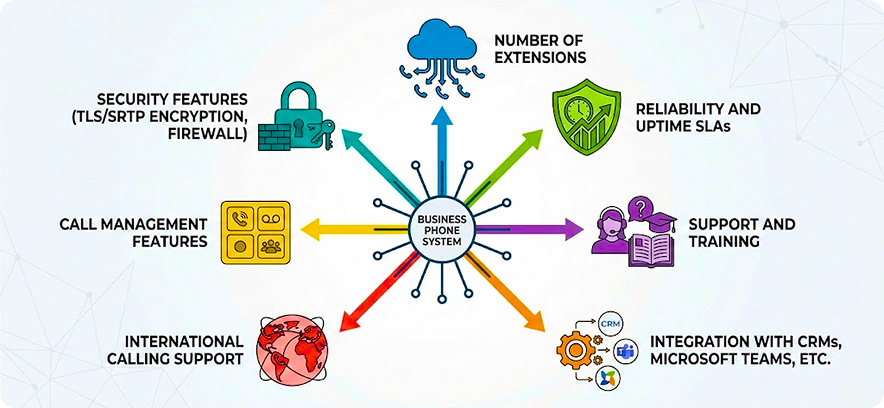
Number of Extensions
A managed PBX should expand as smoothly as your business does. Providers that offer unlimited or low-cost extension options allow you to scale without disruptions, costly migrations, or the fear of hitting system limits.
Reliability and Uptime SLAs
Communication systems must remain dependable during peak operations. Continuity is ensured by choosing a provider with a 99.99% uptime guarantee, and customer interactions, along with internal collaboration, are protected from costly interruptions or technical breakdowns.
Support and Training
The right service includes more than technology; it comes with guidance. Around-the-clock support, onboarding, and training resources ensure your staff quickly adapts, reducing downtime and allowing teams to benefit from PBX tools immediately.
Integration with CRMs, Microsoft Teams, etc.
managed PBX works best when it fits into the tools your business already uses. Workflows are simplified, records are kept aligned, and teams are empowered with instant customer insights through seamless connections with CRMs, helpdesks, or Microsoft Teams.
International Calling Support
Communication that goes beyond borders is needed by global businesses. Providers offering affordable international rates and local numbers in multiple countries help you maintain strong client relationships worldwide while keeping calling expenses predictable.
Call Management Features
Every call matters, whether it’s from a client or a partner. A polished customer experience is ensured by features like IVR System, auto-attendants, call forwarding, and voicemail-to-email, while missed opportunities and lost productivity are prevented.
Security Features (TLS/SRTP Encryption, Firewall)
Protecting sensitive conversations should never be an afterthought. Providers with TLS/SRTP encryption, fraud detection, and firewalls ensure compliance while reinforcing trust, giving clients confidence that their data is handled responsibly.
Best managed PBX for Specific Use Cases
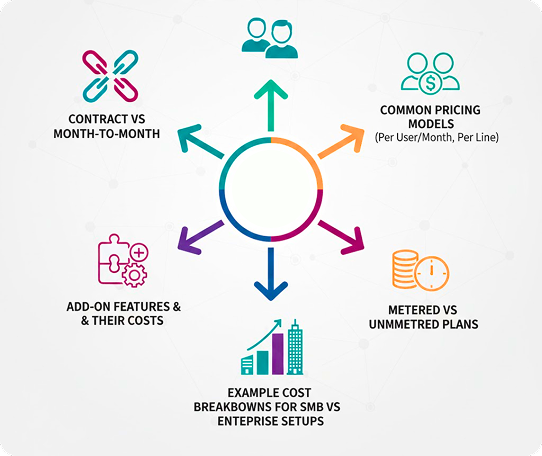
Common Pricing Models (Per User/Month, Per Line)
Pricing is usually calculated either by user or by line. A per-user plan works well for expanding teams, while per-line structures often suit businesses with shared desks or rotating staff schedules.
Metered vs Unmetered Plans
Charging by usage is done by some providers, where every minute is counted. Unlimited calling for a flat fee is included by others. Light callers are fitted by metered plans, while high-volume environments like sales floors or support centres are served by unmetered options.
Add-On Features & Their Costs
Essential functions may be included, but extras like call recording, analytics, or CRM integration often cost more. Analysis of crucial features helps to prevent unnecessary expenses and ensures important tools remain available.
Contract vs Month-to-Month
Multiple providers offer long-term contracts at significantly discounted rates compared to monthly packages. Higher charges are applied to users who demand monthly packages. However, flexibility is provided for seasonal operations or companies in transition.
Example Cost Breakdowns for SMB vs Enterprise Setups
Smaller businesses have long-term and predictable monthly expenses between $150 and $250. Large enterprises with multiple employees can exceed $15,000. It mainly depends on selected features and usage requirements.
Ready to Choose Your Managed PBX?
We’ll help you pick the best provider for your size, budget, and integrations — without wasting weeks on demos.
Verdict
Which managed PBX Should You Choose?
The most suitable managed PBX for businesses depends on various factors. It mainly includes business size, communication needs and budget. However, it also includes several other factors, such as specific features.
After analyzing multiple providers based on various factors, we recommend three of them. For small businesses, Ooma Office offers excellent value, combining an easier interface with affordable pricing and essential features. For remote and hybrid teams, Zoom Phone is an ideal option. Its package includes seamless integrations with Microsoft Teams and collaboration tools that keep distributed workforces connected without disruption. RingCentral remains the strongest choice for enterprises. It primarily offers advanced scalability, analytics, and international coverage designed for complex, multi-location organizations.
The common features of all recommended providers are reliable uptime, strong support, and flexible pricing. However, we believe that final decisions should be made on specific guidance by the expert and analysis of actual needs of the company. It may involve cost-effectiveness, remote work or managing global communication needs.
Still Not Sure Which PBX Fits Best?
Share your team size, budget, and must-have features — we’ll recommend the best managed PBX provider for your exact setup.