Best Business VoIP Providers
Voice over Internet Protocol (VoIP) moves phone calls from copper lines to the Internet. In simple terms, your voice is converted to digital packets, sent across the network, and reassembled at the other end. By 2025, VoIP matters because it gives businesses clearer calls, flexible location options, and lower ongoing costs than traditional landlines. Unlike old phone systems that relied on dedicated circuits and costly hardware, VoIP uses existing internet connections and software-based features, so adding users or new functions is faster and less expensive. Demand for VoIP is rising as firms seek predictable monthly pricing, dependable call quality, and integrations with tools they already use. After analyzing 35+ providers and thousands of user reviews on Gartner, G2 and social platforms, we selected the top vendors for 2025. Below you’ll find a focused comparison highlighting pricing ranges, call quality, and the practical features that matter to day-to-day operations.
Get the Best VoIP for Your Business
Tell us your team size and top priorities — we’ll recommend the best VoIP provider for your exact needs.
Best Business VoIP Providers
| Provider | Starting Price* | Key Features | Best For | Badge / Highlight |
|---|---|---|---|---|
| Zoom Phone | $10/user/month (Metered plan) | Voicemail transcription, call routing, internal unlimited calling, add-ons for outbound plans | Teams already using Zoom for meetings | Best Value / All-rounder |
| RingCentral | ~$20/user/month (annual core plan) | Multi-channel (calls, SMS, video), auto attendants, analytics, integrations | Businesses needing full spectrum comms | Best for Flexibility |
| Nextiva | ~$30/user/month (Core annual) | Call analytics, CRM integration, omnichannel support | SMBs with customer support focus | Best for Multichannel |
| 8x8 | Custom pricing | Global calling, SMS, video, UC + contact center | International calling needs | Best for Global Reach |
| Vonage Business | From ~$13.99/line/month | APIs, messaging, routing, virtual numbers | Developer flexibility | Best for Customization |
| Dialpad | $15/user/month (basic) | Live transcription, AI insights | Voice intelligence & easy setup | Best for AI & Insights |
| GoTo Connect | ~$27+/user/month | VoIP, chat, video, queueing | Remote unified teams | Best for Remote Teams |
| Microsoft Teams Phone | $10/user/month add-on | Deep Microsoft 365 integration | Microsoft ecosystem businesses | Best for Microsoft Users |
| Aircall | ~$30/user/month | Call center tools, CRM integration | Sales / support teams | Best for Sales |
| Ooma Office | $19.95/user/month | Virtual receptionist, call forwarding | Small businesses | Best for Simplicity |
Want a Shortlist Instead of Guessing?
We’ll narrow this list down to the top 3 providers based on budget, call quality, and integrations.
Top 10 VoIP Providers

Zoom Phone is a cloud-based calling system. It allows users to make and receive calls through desktop or mobile apps while managing voicemail, routing, and contacts in a single interface. The service is ideal for companies already using Zoom for video conferencing and looking to expand into full business telephony without switching to another provider.
Key Features
Zoom Phone includes voicemail transcription, internal unlimited calling, number porting, call queues, and call transfer options. It allows outbound plans to be added when needed and offers built-in encryption to secure data during transmission. These features make it a practical choice for businesses seeking flexibility and control over call management with a simple setup.
Integrations
The platform integrates smoothly with Zoom Meetings and Zoom Chat. Furthermore, it offers unified communication under one platform. It also connects with popular tools such as Google Calendar, Microsoft Outlook, and Salesforce. Support for single sign-on and identity management solutions makes it easier for administrators to manage user accounts and permissions efficiently.
Benefits and Drawbacks
Benefits: Zoom Phone is simple for existing Zoom users to adopt, as it uses the same interface. It provides consistent audio quality, dependable internal calling, and flexible plan structures. Both desktop and mobile apps deliver a stable experience.
Drawbacks: Outbound calling add-ons can increase monthly costs for firms with high call volumes. International calling rates may not always be the most cost-effective, and customer support can take additional time to address complex configuration issues in large-scale deployments.
Pricing Breakdown
The metered plan starts at $10 per user each month, covering internal unlimited calling, voicemail transcription, and routing. Outbound calls are charged separately, or businesses can purchase flat-rate regional add-ons. Higher plans include more routing options, international coverage, and expanded integrations. Additional charges may apply for taxes or number porting.
Best For
Zoom Phone best serves businesses that already use Zoom Meetings or other Zoom services. It offers a consistent platform for meetings, voice, and chat for remote, hybrid and distributed teams. Its simple interface reduces training time and eliminates the need for dedicated teams. Additionally, it supports organizations aiming for rapid adoption across multiple departments.
Unique Selling Point (USP)
The seamless integration of Zoom Phone with other Zoom applications is considered the main strength. It reduces fragmentation of applications and simplifies management by combining video, chat, and voice into one system. This unified setup saves time and lowers administrative overhead. Moreover, it provides a consistent experience for all users, regardless of location or device.

RingCentral voip phone includes call forwarding, call queues, auto attendants, analytics, voicemail-to-email, and text messaging. This interface offers various features for users, including call recording, document sharing, and holding video conferences. Monitoring and reporting are supported by advanced RingCentral administrative systems. Moreover, it ensures teams have clear visibility into call performance and user activity.
Key Features
RingCentral voip phone includes call forwarding, call queues, auto attendants, analytics, voicemail-to-email, and text messaging. This interface offers various features for users, including call recording, document sharing, and holding video conferences. Monitoring and reporting are supported by advanced RingCentral administrative systems. Moreover, it ensures teams have clear visibility into call performance and user activity.
Integrations
The platform connects with Salesforce, Google Workspace, Microsoft 365, Slack, HubSpot, and hundreds of other business tools. It supports users to manage contacts, calendar events, and workflows within familiar apps. RingCentral’s open API further allows custom integrations, letting businesses align communication processes with their preferred CRM or support platforms.
Benefits and Drawbacks
Benefits: RingCentral delivers reliable call quality, strong uptime, and a mature feature set for enterprise and mid-sized companies. Its analytics tools help track team performance, and mobile access keeps employees connected anywhere.
Drawbacks: The wide range of plans may confuse small teams, and pricing can rise with the addition of add-ons. Furthermore, technical training is required for non-technical users to use different integrations effectively. Similarly, customer response can vary depending on the package.
Pricing Breakdown
RingCentral’s basic plan roughly costs around $20 per user per month when billed on an annual basis. Upgraded tiers include features such as unlimited international calls, in-depth analytics, and built-in contact center functions. Pricing may rise with advanced integrations or API usage. Most plans already cover unlimited domestic calling, messaging, and essential video conferencing tools to support internal communication.
Best For
RingCentral suits medium to large businesses that want a unified system for calls, messaging, and video. It works well for organizations with distributed teams or those planning to scale communication capacity. The platform is ideal for firms prioritizing integration, data visibility, and managed security without relying on separate vendors.
Unique Selling Point (USP)
Unified platform is the primary strength of RingCentral that combines telephony, video and messaging under one dashboard. Its deep integration options and enterprise-grade analytics give businesses precise control over communication flow. This flexibility allows companies to grow without changing systems, ensuring continuity and consistent service as operations expand.

Nextiva is a cloud-based business communication system. Single platform offers combined features including voice, messaging and analytics. Furthermore, it supports teams to handle calls, manage customers, and track performance through an organized dashboard. The platform is especially suited for small and mid-sized businesses that rely on phone-based customer engagement and want a reliable setup for daily operations.
Key Features
Nextiva voip phone system includes call routing, analytics, voicemail-to-email, and CRM integration. Users can record calls, review analytics, and manage customer details through one interface. It also provides queue management and screen pop notifications for incoming calls. These functions make it easier for teams to maintain consistency in customer communication and improve response efficiency.
Integrations
The system connects with popular tools such as Salesforce, HubSpot, Microsoft Outlook, and Zendesk. With open API support, businesses can tailor functions to match their specific processes. This ensures smooth coordination between communication platforms and internal business applications.
Benefits and Drawbacks
Benefits: Its main benefits are strong call quality, organized call reporting, and reliable uptime. Its CRM integration supports customer-facing teams by centralizing data and improving accessibility.
Drawbacks: It is costly for smaller firms, especially with the addition of advanced analytics or automation features. Some integrations need additional configuration, and businesses with simple needs might find certain features underutilized.
Pricing Breakdown
Nextiva’s core plan begins at about $30 per user each month on annual billing. Higher-tier options include advanced reporting, multichannel communication, and contact center features. Taxes, setup fees, and number porting can increase total costs. The flexibility of plan upgrades helps businesses match their requirements as they scale.
Best For
Nextiva suits businesses that prioritize customer engagement and structured call management. It is ideal for support, service, and sales teams that depend on reliable communication channels. Organizations that value data-driven insights and CRM integration benefit most from its unified interface and reporting features.
Unique Selling Point (USP)
Voice communication is combined with real-time analytics and customer management tools in the Nextiva dashboard. It offers a clear overview of call activity and service metrics. Therefore, it helps managers to make quick and informed decisions. This cohesive setup promotes consistency, enhances operational visibility, and strengthens customer satisfaction across all communication channels.

8×8 is a cloud-based business phone and communication system that combines voice, video, and messaging in one platform. It supports both internal collaboration and external customer engagement through a unified interface. The service is built for companies that manage cross-border communication or run customer service operations across multiple regions.
Key Features
8×8 offers high-definition voice and video calling, call recording, voicemail-to-email, auto attendants, and analytics. It supports intelligent call routing, shared lines, and queuing features that help teams manage incoming calls efficiently. The platform also provides reporting tools that allow managers to monitor activity and maintain consistent service quality.
Integrations
It integrates with Microsoft Teams, Salesforce, Google Workspace, and Zendesk. It aligns communication data and streamlines workflows with API support for custom setups. Additionally, it unifies customer information in one place.
Benefits and Drawbacks
Benefits: 8×8 delivers strong call reliability, clear audio quality, and reliable uptime. It supports international calling with global number availability. Therefore, it contains several benefits for companies with regional branches or remote teams.
Drawbacks: Plan pricing can differ by country, which makes budgeting more complex for global users. Some setup steps require technical assistance, and customizing integrations may take additional time during deployment.
Pricing Breakdown
Pricing depends upon the region of operation and the package. A typical business package encompasses unlimited calling, team messaging and video conferencing. However, higher tiers add contact center tools, analytics, and wider global coverage. Extra fees may apply for setup and advanced routing.
Best For
8×8 best serves businesses that operate internationally or manage remote teams across different locations. It suits companies that prioritize reliable global connectivity, integrated collaboration, and analytics visibility. The platform’s flexible structure makes it suitable for organizations that expect to scale communication capacity as their operations grow.
Unique Selling Point (USP)
8×8 is unique for its Global reach and integrated communication network. It allows businesses to maintain regional numbers and manage calls worldwide through a single system. It simplifies operations by combining telephony, analytics, and customer engagement tools. However, it ensures a consistent experience across devices and locations.

Vonage Business is a cloud-based platform that provides voice, messaging, and video services for businesses of different sizes. A single dashboard offers various options, including managing calls, texts and virtual numbers. The service is known for its flexibility. Moreover, it makes it suitable for businesses that need customizable communication systems.
Key Features
Vonage VoIP Phone includes virtual phone numbers, call forwarding, voicemail-to-email, and advanced call routing. It also provides APIs for messaging, video, and voice that allow developers to build custom communication workflows. The system’s analytics dashboard helps businesses track usage patterns and improve overall communication performance.
Integrations
Vonage integrates with Salesforce, HubSpot, Microsoft Teams, and Zoho CRM, among other applications. These integrations allow customer data to stay in sync across communication channels. Through its API suite, Vonage enables deeper customization, helping businesses connect their communication environment with proprietary or industry-specific tools.
Benefits and Drawbacks
Benefits: Reliable call quality, simple management tools, and flexible customization options are prominent advantages of Vonage. Its API access gives developers control over call flows and integrations.
Drawbacks: Technical support is required for the setup of advanced API features. Furthermore, costs may increase with additional integrations or premium services. The interface is excessively detailed even for basic users.
Pricing Breakdown
Vonage Business plans start at around $13.99 per line each month. Packages and features such as analytics, video conferencing, and integration options define the pricing. Higher plans add advanced routing tools, call recording, and API access. Additional charges may apply for international numbers, usage fees, or setup assistance.
Best For
Vonage Business suits companies that value flexibility and custom development. It works best for organizations with in-house IT or software teams that want to integrate voice and messaging directly into their workflows. Moreover, it is ideal for growing businesses that need scalable communication tools.
Unique Selling Point (USP)
The primary strength is its API platform that allows deep customization. Customized designing of communication flows supports the operational structure of businesses. Vonage is a highly attractive option for companies seeking tailored communication solutions.
Not Sure Which VoIP to Pick?
Get expert help choosing the best option based on call volume, features, and real pricing.s.

Dialpad is a modern cloud-based phone system that combines voice, video, messaging, and AI-powered insights in a single platform. It allows teams to make and receive calls, hold meetings, and share messages from any device. Designed for simplicity and intelligence, it helps businesses improve call quality and productivity without managing complex infrastructure.
Key Features
Dialpad provides features such as real-time transcription, voicemail-to-text, automated note-taking, and live speech coaching. It also offers call routing, analytics, and user management controls. The platform delivers call summaries and conversational insights powered by AI. It enables businesses to track patterns, improve communication quality, and support better team performance.
Integrations
Dialpad integrates with Google Workspace, Microsoft 365, Salesforce, HubSpot, and Zendesk, enabling teams to access customer details, update records, and schedule follow-ups. API access allows advanced custom connections to align the platform with internal systems.
Benefits and Drawbacks
Benefits: Dialpad offers simplified communication with clear audio quality, quick setup and intelligent features. Its real-time AI transcription and analytics save time and improve accuracy in client interactions.
Drawbacks: The lower-tier plans include limited integrations, and AI features may require higher plans for full access. Businesses with intricate call routing might need additional configuration during setup to match specific operational workflows.
Pricing Breakdown
Dialpad’s standard plan starts at $15 per user each month. The standard package consists of unlimited domestic calling, messaging, and basic AI tools. Advanced plans offer more integrations, analytics, and international calling features. Additional costs may apply for advanced AI features or specific locations.
Best For
Dialpad is ideal for small to mid-sized businesses seeking smart communication tools with easy setup. It fits teams that rely on transcription, analytics, and mobile access. Sales, support, and hybrid teams benefit from its real-time insights and simple management features.
Unique Selling Point (USP)
The prominent advantage of Dialpad is its AI-powered and real-time intelligence. The system listens, transcribes, and analyzes conversations to highlight action items and coaching points. This combines automation and simplicity to help businesses strengthen communication quality and decision-making without increasing administrative workload.

GoTo Connect is a unified cloud communication platform that combines VoIP calling, video meetings, and team messaging into one interface. It enables users to manage calls and host virtual meetings. Moreover, it collaborates efficiently across devices. It simplifies communication because it is primarily designed for remote and hybrid teams. Similarly, it maintains consistent performance and centralized management.
Key Features
GoTo Connect offers VoIP phone system, auto attendants, call queueing, routing management, and video conferencing. It mainly involves custom call flows, ring groups, and detailed call analytics. Clear call quality and secure data transmission are ensured by this platform. Furthermore, it provides flexibility for organizations managing distributed teams and multiple communication channels.
Integrations
GoTo Connect has the ability to integrate with Microsoft 365, Slack, Salesforce, Google Workspace, and Zoho CRM. It also connects with scheduling and ticketing systems to automate workflows and improve customer handling. Seamless transitions are enabled through these integrations between internal collaboration and customer communication without switching platforms.
Benefits and Drawbacks
Benefits: GoTo Connect offers consistent performance for remote and hybrid environments, easy administration, and reliable uptime. It provides a balance of voice, chat, and video tools within one subscription, reducing tool clutter and cost. User interfaces are intuitive, and setup is quick for most small to medium businesses.
Drawbacks: The mobile app could benefit from additional optimization for call transfer and connection stability. Standard packages offer basic features, but advanced analytics are available in premium plans. Extra configuration could be required for integration with legacy systems, especially for larger deployments.
Pricing Breakdown
Standard plans of GoTo Connect typically start around $27 per user per month. It covers unlimited calling, messaging, and video conferencing. Higher tiers include enhanced routing, analytics, and international calling options. Custom pricing is available for enterprises requiring multi-location management or integrations with CRM and contact center tools.
Best For
GoTo Connect suits remote and hybrid teams seeking a unified platform for voice and video collaboration. It is ideal for small to mid-sized businesses that need a reliable VoIP solution without managing multiple vendors. The scalability and simplicity of the platform make it a perfect choice for growing companies.
Unique Selling Point (USP)
GoTo Connect is famous for its multiple features in one interface, including VoIP, chat and video tools. Similarly, its simplicity, reliable uptime and quick deployment are important characteristics of it. Moreover, GoTo discourages the intricate setups and fragmented systems. This unified and efficient model enhances collaboration and reduces communication issues across departments and devices.

Microsoft Teams Phone enhances the Microsoft 365 suite by adding a fully integrated voice calling system within the Teams workspace. Users can make, receive, and transfer calls through desktop or mobile devices while staying connected with other Microsoft tools. It helps businesses replace older PBX Phone systems with a secure, cloud-based solution that blends easily into existing workflows.
Key Features
The service includes voicemail, call forwarding, auto attendants, and queue management. It supports both domestic and global calling with flexible add-ons for analytics and routing. Direct integration with Microsoft 365 apps allows employees to handle calls, meetings, and files in one place, improving consistency and user efficiency.
Integrations
Teams Phone connects directly with Microsoft 365 applications such as Outlook, SharePoint, and OneDrive. It also integrates with major CRM and contact center systems like Dynamics 365 and Salesforce through certified extensions. Businesses can use Direct Routing or Operator Connect to link existing PSTN carriers, maintaining flexibility in network and cost management.
Benefits and Drawbacks
Benefits: Team Phone fits seamlessly into environments already using Microsoft 365. Only one interface offers various options such as voice, meetings and collaboration tools. Moreover, it helps users stay focused and reduces the need for multiple apps. The system provides enterprise-grade security, compliance, and reliable global availability.
Drawbacks: Deployment may require technical setup, especially for larger networks or Direct Routing. Advanced analytics and third-party integrations may need extra licensing. Total costs can rise when combining calling plans, carrier fees, and add-on services.
Pricing Breakdown
Team Phone is available as an add-on for about $10 per user each month, with options to include calling plans and regional coverage. Enterprises can customize packages to suit internal routing or carrier connections. Additional fees may apply for premium analytics, compliance tools, or extended global access.
Best For
Microsoft Teams Phone is best suited for organizations that rely heavily on Microsoft 365 and prefer a unified workspace for communication and collaboration. It benefits mid-sized and large enterprises that require centralized control, high security, and simplified management of calls alongside productivity applications.
Unique Selling Point (USP)
Its main advantage is native Microsoft 365 integration, enabling employees to communicate, collaborate, and manage tasks on one platform. This unified setup enhances productivity, ensures compliance, and simplifies IT management for consistent, controlled enterprise operations.

Aircall is a cloud-based phone platform designed for sales and support teams seeking fast deployment and easy management. It enables calling from desktop or mobile apps with real-time metrics. Moreover, it offers clear communication without traditional system complexity.
Key Features
Principal features of Aircall are intelligent call routing, voicemail handling, shared call inboxes, and live call monitoring. It supports warm transfers, queue management, and team collaboration through shared contacts. The system emphasizes efficiency and visibility, allowing users to manage customer conversations from a single, connected environment.
Integrations
Aircall is able to seamlessly connect with major CRMs and business tools, including Salesforce, HubSpot, Zendesk, Pipedrive, and Microsoft Teams. Its open API supports custom integrations to create specialized workflows. These connections automate call logging, synchronize contact information, and unify data across teams. Therefore, it ultimately enhances collaboration between sales and support departments.
Benefits and Drawbacks
Benefits: Aircall is easy to deploy and needs little technical management. Its collaborative design lets teams share numbers, track performance, and manage queues, while CRM and helpdesk integrations enhance efficiency and visibility of customer interactions.
Drawbacks: Call quality can fluctuate if network conditions are weak. Some reporting and analytics features are available only in higher subscription tiers. Global calling rates and number availability differ by region, which can affect cost planning for international teams.
Pricing Breakdown
The basic plan of Aircall starts at $30 per user per month. It covers essential calling features, call queues, and CRM integrations. Premium plans offer real-time analytics, monitoring tools, and extended customization through API access. Enterprise packages include additional support, onboarding assistance, and international number availability.
Best For
Aircall is best suited for businesses with active sales or customer support operations that rely on integrated communication systems. It benefits growing organizations that need a flexible, cloud-based phone setup capable of connecting teams and CRMs without extended installation or maintenance work.
Unique Selling Point (USP)
Unique features of Aircall are its strong CRM and help desk integrations. It allows teams to manage calls and customer data in one interface. As a result, it shortens response times and improves collaboration. Additionally, it enhances the overall customer experience by keeping communication consistent across every touchpoint.

Ooma Office is a cloud-based phone service for small businesses. It provides business calling through desktop and mobile apps while keeping setup simple and predictable. The service focuses on reliable voice quality and clear pricing, making it a practical choice for firms that need a low-maintenance phone system.
Key Features
Ooma Office offers a virtual receptionist, call forwarding, voicemail-to-email, and ring groups. Users can set up call transfers, conference bridges, and basic call recording. The platform supplies a mobile app and a web portal for managing users and numbers. These features deliver straightforward call handling without complex configuration.
Integrations
Ooma integrates with common business tools such as Microsoft 365 and Google Workspace for contact sync and calendar links. It supports CRM connections through third-party connectors and offers APIs for basic automation. Integration options are modest compared with larger vendors but cover common office workflows for small teams.
Benefits and Drawbacks
Benefits: Ooma Office delivers clear voice quality, a simple management portal, and predictable monthly fees. Small teams benefit from quick setup, basic call features, and local number support.
Drawbacks: The major drawback of Aircall is the unavailability of some advanced analytics and enterprise features. International calling and toll-free options may be more expensive than other providers. Similarly, larger firms may find customization and integration options limited compared with major providers. Support quality varies, with premium assistance on higher plans. Hardware options are available through partners for on-premise phones.
Pricing Breakdown
Ooma Office pricing begins at $19.95 per user monthly for the Office Essentials plan, including local calling, a virtual receptionist, and mobile access. Additional features like toll-free numbers, international minutes and others are offered in premium plans. One-time setup or hardware purchases may increase initial costs.
Best For
Ooma Office is best for small businesses and local offices that need a reliable, low-cost phone system. It fits teams that prefer simple administration and predictable billing. Service-based shops, professional practices, and retail locations benefit from fast deployment and basic call handling without large IT overhead.
Unique Selling Point (USP)
Simplicity and predictable costs for small operations are the main advantages of Ooma Office. It combines essential phone features with easy setup and a simple management portal. Ooma delivers an efficient, cost-effective phone solution for small teams that need reliable calling without complex configuration.
Avoid a Costly VoIP Mistake
We’ll help you compare pricing, call quality, uptime, and integrations before you commit.
How to Choose the Right VoIP Provider
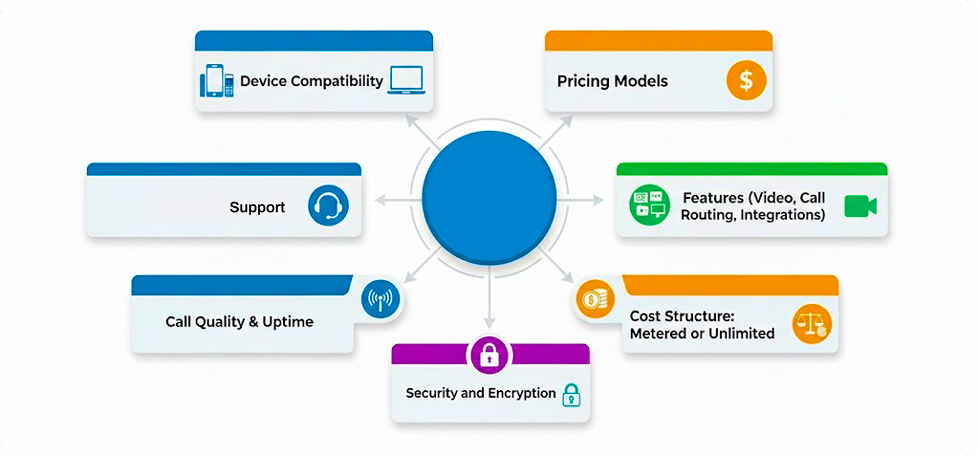
Pricing Models
Always select a VoIP provider with transparent pricing. Likewise, evaluate per-user or bundled plans, including call rates and additional features for predictable monthly costs without hidden costs. Moreover, it should match your usage volume and team size.
Features (Video, Call Routing, Integrations)
The capacity of the platform for various features such as video conferencing, sophisticated call routing and integration with CRM systems must be evaluated before finalizing the deal. A comprehensive feature set facilitates smoother internal communication and enhances customer support operations. Furthermore, it accommodates growth as communication demands expand within your organization.
Device Compatibility
The selected VoIP system should be able to support both desktop and mobile applications across major operating systems. It improves connectivity of the employees, whether working on-site or remote. Additionally, it ensures consistent access to calls and collaboration tools from any location.The selected VoIP system should be able to support both desktop and mobile applications across major operating systems. It improves connectivity of the employees, whether working on-site or remote. Additionally, it ensures consistent access to calls and collaboration tools from any location.
Support
Choose the package that includes continued and immediate technical support. Reliable assistance significantly minimizes downtime and resolves configuration issues quickly. In addition, communication systems remain stable and efficient during critical business operations.
Call Quality & Uptime
Prefer vendors with proven service reliability and low latency across regions. Customer interactions remain uninterrupted if consistent call clarity and guaranteed uptime are ensured in a timely manner. Moreover, it preserves professionalism and maintains trust in the business during high-demand or peak business hours.
Best VoIP Providers for Specific Use Cases
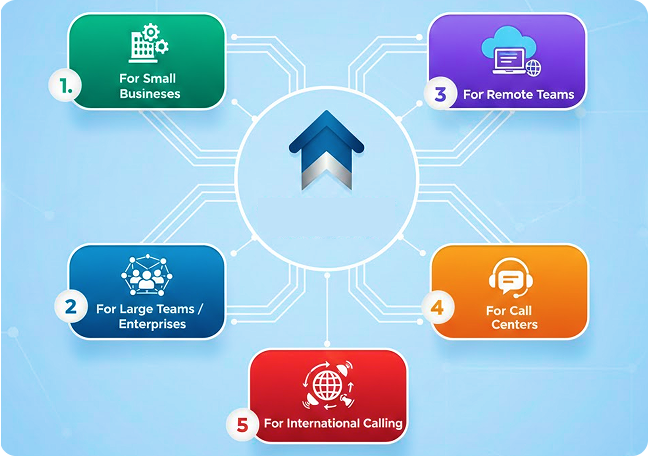
For Small Businesses
Ooma Office and RingCentral are ideal for small businesses seeking reliability and easy setup. They provide essential call features, predictable pricing, and minimal technical requirements. Moreover, it supports teams in managing communication efficiently without dedicated IT resources.
For Large Teams / Enterprises
Microsoft Teams Phone and Zoom Phone suit large organizations needing scalability and system control. They integrate voice, video, and collaboration within one platform, supporting enterprise-grade security, advanced routing, and compliance for multi-department and multi-location operations.
For Remote Teams
GoTo Connect and Dialpad work well for distributed teams that rely on cloud accessibility. Their unified communication platforms enable calling, chat, and meetings from any device. Similarly, it keeps teams coordinated and responsive regardless of geographic boundaries.
For Call Centers
Nextiva and Aircall serve as call centers software requiring real-time analytics, call monitoring, and CRM integration. These systems enhance team performance through call tracking and reporting while simplifying agent management and improving customer service outcomes.
For International Calling
8×8 and Vonage Business are best suited for companies with global clients or remote offices. They provide international number coverage, localized routing options, and cost-effective calling plans that maintain high call quality across regions and time zones.
Avoid a Costly VoIP Mistake
We’ll help you compare pricing, call quality, uptime, and integrations before you commit.
Verdict
Which VoIP Provider Should You Choose?
The selection of the best VoIP Provider depends upon various factors, including price, usage and features. Similarly, from the business point of view, company size, workflow, and communication priorities are the major components affecting selection. Zoom Phone offers affordability and reliability with its clear pricing and easier setup. Similarly, it supports seamless integration with Zoom Meetings, which is ideal for small to mid-sized businesses. RingCentral remains the strong choice for feature depth and scalability.
Furthermore, it offers advanced analytics, multi-channel communication and flexibility for growing enterprises. Meanwhile, Microsoft Teams Phone is the best fit for organizations already using Microsoft 365, delivering enterprise-level security and full integration with collaboration tools. Each platform balances cost and capability differently. However, these three consistently perform well across reviews for call quality, uptime, and overall user experience. Therefore, it makes them reliable long-term solutions for modern business communication.
Talk to Voxtium’s VoIP Advisors
Get a personalized recommendation and pricing guidance for your business — fast and unbiased.